
Pi-MultiFlasher V1.0 – Easy Fastboot Flash Tool for Android Devices
Pi-MultiFlasher V1.0 is a simple tool made for flashing Android phones in fastboot mode. This tool helps users flash firmware, fix boot problems, reboot phones, and erase FRP easily. Many people use fastboot commands in command prompt, but this tool makes everything easy with buttons and simple options. This tool is very useful for mobile repair shops and users who flash phones regularly.
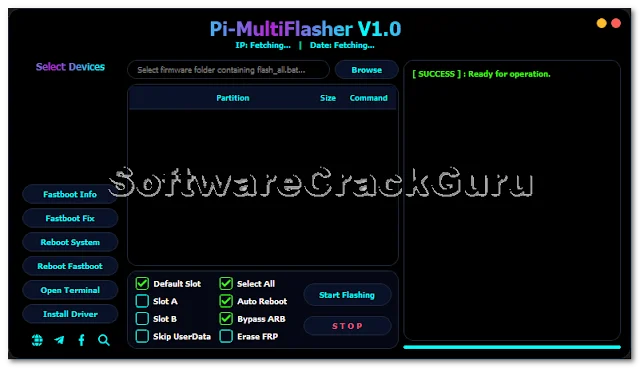
The tool works by reading the firmware folder and automatically loading flashing files. You just need to select the firmware folder and start flashing. The tool will flash all partitions automatically without typing commands.
Main Features
- Flash firmware in fastboot mode
- Support multiple device flashing
- Fastboot device information
- Fastboot fix option
- Reboot system option
- Reboot fastboot option
- Erase FRP option
- Skip userdata option
- Auto reboot after flashing
- Select Slot A or Slot B
- Driver installer option
- Simple and clean interface
What’s New in Pi-MultiFlasher V1.0
- New clean user interface
- Multi device flashing support
- Automatic firmware partition loading
- Progress bar flashing system
- FRP erase option added
- Slot switching feature added
- Driver download option added
Real Life Shop Experience
I personally tested this tool in my mobile repair shop. One customer came with a phone stuck in fastboot mode and the phone was not booting. I connected the phone in fastboot mode, opened Pi-MultiFlasher, selected the firmware folder, and started flashing.
The flashing process started and the progress bar showed flashing status. After flashing finished, the phone rebooted automatically and started normally. The customer was very happy and the phone problem was solved. This tool saves a lot of time because no need to type fastboot commands manually.
File Information
File Name: Pi-MultiFlasher_V1.0.zip
File Size: 25MB
File Type: Free Tool
Password: PiUnlocker
How to Use Pi-MultiFlasher Tool
- Download the tool.
- Extract the downloaded file.
- Open the tool.
- Install drivers using Install Driver button.
- Boot phone into fastboot mode.
- Connect phone to PC using USB cable.
- Click Browse and select firmware folder.
- Make sure flash_all.bat file is inside firmware folder.
- Select your device from device list.
- Select options like Auto Reboot or Erase FRP if needed.
- Click Start Flashing.
- Wait until flashing completes.
- Phone will reboot automatically.
Advantages of This Tool
- Very easy to use
- No need to type fastboot commands
- Flash multiple phones at same time
- Useful for mobile repair shops
- FRP erase option available
- Slot fix option for bootloop phones
- Automatic reboot after flashing
- Clean and simple interface
FAQs
Q1: What is Pi-MultiFlasher tool?
It is a fastboot flashing tool used to flash Android firmware easily.
Q2: Can I flash multiple phones at the same time?
Yes, this tool supports multi device flashing.
Q3: Does this tool support FRP erase?
Yes, FRP erase option is available.
Q4: Is this tool free?
Yes, this tool is free to use.
Q5: What firmware folder should I select?
Select the folder where flash_all.bat file is located.