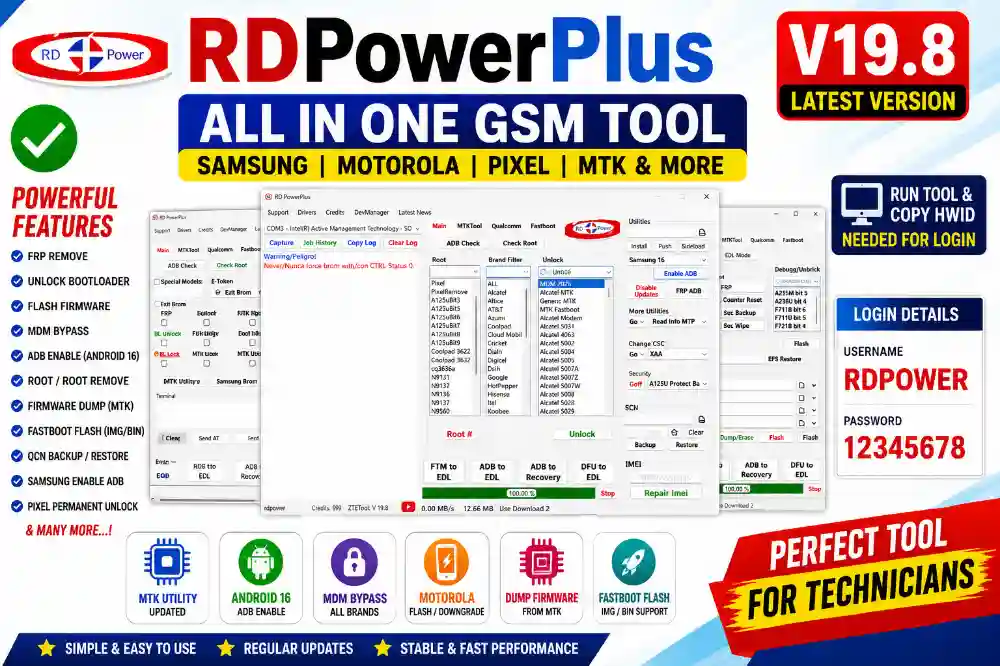
RDPowerPlus Tool V19.8 Latest Version Download | Samsung, Pixel, Motorola & MTK Tool
RDPowerPlus is one of the most useful GSM tools for mobile repairing work.
This software is used by many mobile technicians for FRP remove, flashing, unlock, MDM bypass, rooting, and firmware repair work.
The latest version comes with better Google Pixel support, Motorola improvements, MTK updates, and Android 16 functions.
I tested this tool personally in my shop on Samsung and Motorola devices and the latest version is working very smoothly.
Nowadays many phones come with strong security and normal flashing tools fail on newer models.
That is why many technicians now use RDPowerPlus because it supports Samsung, Motorola, Pixel, TCL, Vortex, Alcatel, and many MTK devices in one software.
What is RDPowerPlus Tool?
RDPowerPlus is a Windows based mobile servicing software made for GSM technicians and repair shops.
This tool helps users unlock phones, flash firmware, repair software problems, enable ADB, bypass MDM, and perform many advanced repair functions.
Earlier, technicians needed many different tools for separate work.
But RDPowerPlus combines many useful features in one simple interface.
That saves both time and money for repair shops.
Main Features of RDPowerPlus Tool
- Samsung FRP support
- Google Pixel unlock support
- Motorola flashing and downgrade
- MTK utility support
- Fastboot flashing
- ADB enable Android 16
- MDM bypass functions
- Firmware dump support
- Samsung debug and unbrick options
- QCN backup and restore
- IMEI repair support
- Fastboot IMG and BIN flashing
- Read MTP information
- Root and root remove support
What’s New in RDPowerPlus V19.8?
- Cloud C8 Prime Unlock Fixed
- Cloud Stratus C7 Unlock Improved for Dual SIM
- Dump Firmware from Rooted MTK Devices Added
- Firmware IMG/BIN Flashing via Fastboot Added
- Automatic XML Creation Support Added
- Motorola Flashing and Downgrade Improved
The latest update mainly improves MTK firmware dumping and Motorola flashing work.
The new Fastboot flashing option now supports IMG and BIN files more smoothly.
According to the changelog, Google Pixel support and MDM functions were also improved in recent updates. 0
Supported Brands
- Samsung
- Motorola
- Google Pixel
- TCL
- Vortex
- Alcatel
- HotPepper
- Coolpad
- OnePlus
- ZTE
- Hisense
- Tecno
- Itel
- Many MTK Devices
Tool Interface Overview
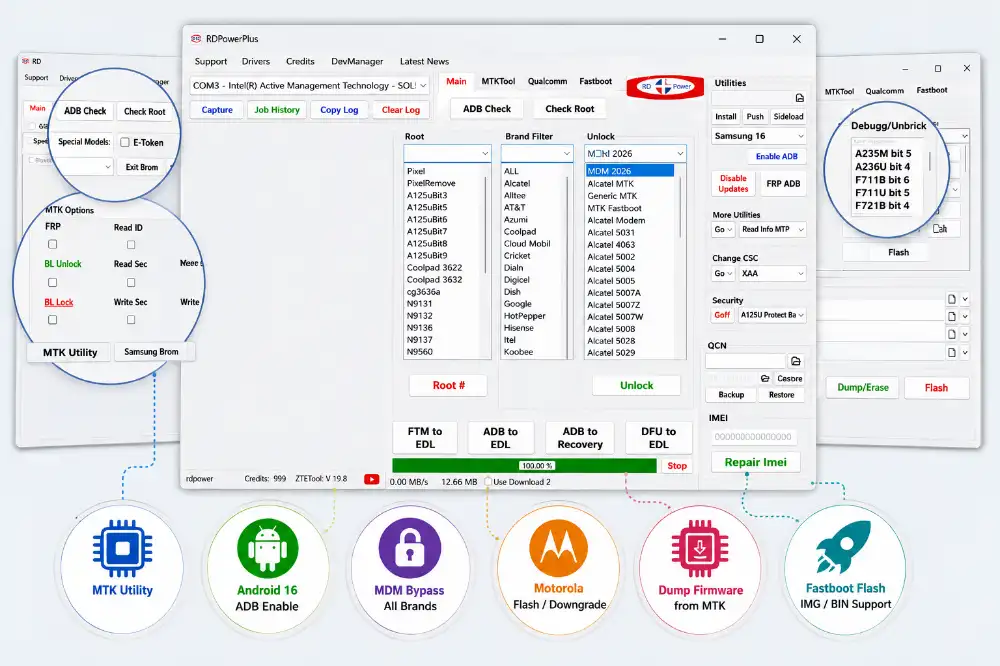
The software comes with multiple tabs like Main, MTKTool, Qualcomm, and Fastboot.
Inside the utility section users can access options like Enable ADB, Disable Updates, FRP ADB, Read MTP Info, and flashing support.
The PDF screenshots also show Samsung debug options, Motorola flashing support, MTK utility functions, firmware flashing section, and Fastboot controls.
The interface is simple and very easy for technicians who do daily repair work. 1
My Personal Testing Experience
A customer recently came to my shop with a Motorola device stuck after flashing.
The phone was not booting properly and another tool failed during downgrade.
I used RDPowerPlus Fastboot flashing option with firmware files and the device flashed successfully.
After reboot, the phone started normally without any issue.
I also tested Samsung Android 16 ADB enable function and it worked properly on supported models.
The software feels faster compared to many older GSM tools.
Important Login Note
Username: RDPOWER
Password: 12345678
After installation, run RDPowerPlus from the desktop shortcut.
The tool will show your HWID.
Copy the HWID properly because it is required for tool login and activation setup.
How to Install and Use RDPowerPlus
- Download the latest RDPowerPlus setup.
- Extract the ZIP file using WinRAR or 7-Zip.
- Install all required USB drivers first.
- Run the setup file and complete installation.
- Open the tool from desktop shortcut.
- Copy your HWID shown inside the tool.
- Login using provided username and password.
- Connect your phone using USB cable.
- Select required function like FRP, Flash, Unlock, or MDM.
- Follow on-screen instructions carefully.
Why Many Technicians Use RDPowerPlus
- Supports many brands in one tool
- Simple and clean interface
- Regular updates
- Useful for daily repair work
- Fast flashing speed
- Good MTK support
- Helpful for Samsung and Motorola repairs
- Easy to understand functions
File Information
Tool Name: RDPowerPlus
Version: V19.8
Platform: Windows
Developer: RDPower Team
Tool Type: GSM Mobile Repair Tool
Password: No Password Required
Download RDPowerPlus Tool
This tool is very useful for GSM technicians and mobile repair shops.
If you repair Samsung, Motorola, Pixel, or MTK devices daily, then this software can save a lot of time.
FAQs
1. Is RDPowerPlus free?
Some features are free, but many advanced functions need credits or activation.
2. Does this tool support Android 16?
Yes, recent updates added Samsung Android 16 ADB and FRP support.
3. Which Windows versions are supported?
The tool works properly on Windows 10 and Windows 11.
4. Is internet required?
Yes, internet connection is needed for login and server functions.
5. Can beginners use this tool?
Yes, the interface is simple, but beginners should still be careful while flashing devices.