Fix Vivo Fingerprint & Redmi Errors
Do you have problems with your Vivo fingerprint sensor?
Or is your Redmi phone stuck with a message saying “DM Verity Corrupted”?
⚠️ Before You Start
Make sure you have these things ready:
- Computer: A Windows laptop or PC.
- USB Cable: A good quality cable to connect your phone.
- Drivers: Install ADB and Fastboot drivers on your PC.
- Battery: Charge your phone to at least 30%.
Also – MCT OFP Extractor Tool_GSMYOGESH
Part 1: Fix Vivo Fingerprint Problems
If your Vivo phone shows “Calibration Error” or the fingerprint option is missing, follow these steps:
Step 1: Connect Your Phone
- Turn on your Vivo phone.
- Go to Settings → System Management → Developer Options.
- Turn ON “USB Debugging”.
- Connect your phone to the PC with the USB cable.
- If a message appears on your phone, tap Allow or OK.
Step 2: Choose Your Fix
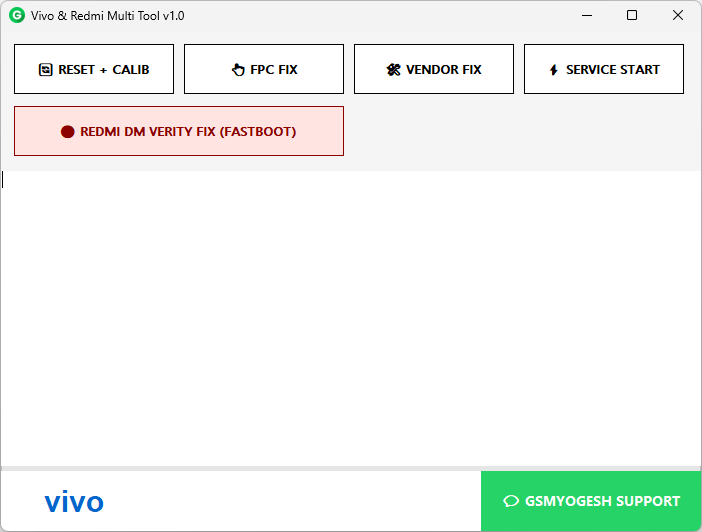
Open the tool. You will see 4 buttons:
- 🔄 RESET + CALIB (Best Option)
- Cleans old data and resets the sensor.
- Phone restarts when done.
- 👆 FPC FIX
- Use this if the first button did not work.
- 🛠️ VENDOR FIX
- Helps with deeper software issues like “Persist” errors.
- ⚡ SERVICE START
- Opens the hidden calibration menu on your phone.
Step 3: Check the Result
- Green Text (Ok): Success! Your fingerprint works again.
- Red Text (Error): Connection failed. Check your cable and try again.
Part 2: Fix Redmi “DM Verity” Error
If your Redmi phone is stuck on the boot logo or shows “System Corrupted”, use this method:
Step 1: Enter Fastboot Mode
- Turn off your Redmi phone.
- Hold Volume Down (-) + Power together.
- Keep holding until you see the Bunny Fastboot logo.
- Connect the phone to your PC.
Step 2: Use the Tool
- Click the big red button: 🔴 REDMI DM VERITY FIX.
- The tool will try 3 different ways to repair the error.
- You don’t need to do anything else.
Step 3: Done!
- When finished, the tool restarts your phone.
- Your phone should now start normally without errors.
📥 Download Links Fix Vivo Fingerprint
- Main Link: Download Here
- Mirror Link: Download Mirror
Still Need Help?
If you are confused or the tool is not working, you can get support:
- Click the Green WhatsApp Button inside the tool.
- Support Name: GSMYOGESH
- Number: +91 8668709402
Enjoy your fixed phone! 🎉