FlexUnlock Tool is a helpful software made for people who work with Android phones. It is mostly used by technicians and users who want an easy way to manage mobile problems like FRP lock, MDM lock, bootloader issues, and system errors.
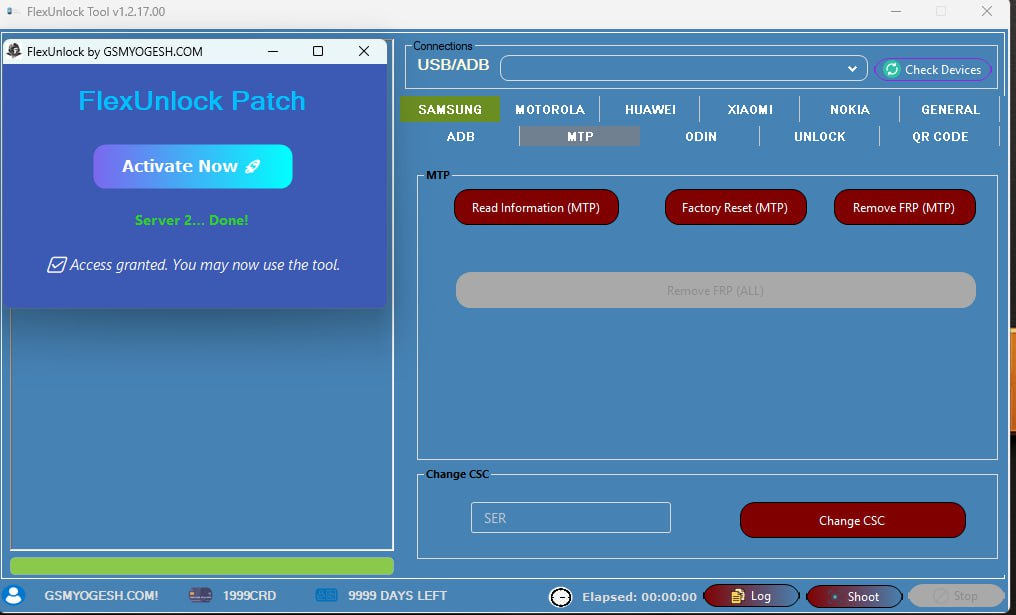
The tool supports many popular brands and works smoothly on Windows systems. Over time, FlexUnlock has become popular because it is simple, fast, and regularly updated.
The newest version, FlexUnlock Tool v1.2.17.00, brings better stability, new Samsung and Pixel support, and improved performance.
What Is FlexUnlock Tool Used For?
FlexUnlock Tool helps users do many mobile repair tasks from one place. It is designed to save time and reduce manual work.
You can use it to:
- Remove FRP lock
- Handle MDM and IT Admin restrictions
- Unlock or lock bootloader
- Read device information
- Work with firmware files
- Fix common Android problems
It supports different working modes like ADB, Fastboot, MTP, and server-based operations.
Also – VIVO FRP Bypass Tool by GSMYOGESH Free Download
Main Features of FlexUnlock Tool
🔹 Samsung Support
- FRP removal using ADB and MTP
- KG lock bypass (latest security supported)
- IT Admin bypass
- CSC change option
- Odin flashing support
- Read and write PIT files
- Boot and EFS functions
- QR code unlock option
🔹 Xiaomi Support
- Device information reading
- Bootloader unlock
- BL to EDL conversion
- MI account removal
- Critical data creation
- Server-based tools
🔹 Motorola Support
- Device info reading
- QCN operations
- MDM unlock
- Bootloader lock / unlock
🔹 Huawei Support
- FRP removal
- Bootloader operations
- Recovery and dload support
🔹 Nokia Support
- MDM removal
- IT Admin bypass
- Bootloader functions
🔹 General Tools
- BIN and IMG file editing
- MTK support (Tecno, Infinix, Itel)
- Pixel FRP removal
- File request system
- Stable server connection
What’s New in FlexUnlock Tool v1.2.17.0
✅ Samsung MDM & KG Bypass
- Works with Knox 3.0 to 3.5
- Supports Android 10 to Android 15
- Compatible with One UI 3 to One UI 6
- Supports Galaxy S, Note, and A series
- No credits required
- Smooth and stable performance
✅ Pixel FRP Improvement
- Supports Pixel 4 to Pixel 8
- Added support for Pixel Fold and Pixel Tablet
- Android 11 to 15 fully supported
- Older Android versions partially supported
- Higher success rate than before
✅ Performance Improvements
- Faster phone detection
- Better stability on Windows 10
- Reduced crashes
- Smooth tool loading
- Improved background processes
How to Install and Use FlexUnlock Tool
Step 1: Download
Download the latest version of FlexUnlock Tool from a trusted source.
Step 2: Extract Files
Extract all files into a new folder on your desktop.
Step 3: Install
Run the setup file as Administrator and complete installation.
Step 4: Open Tool
Launch the tool after installation.
Step 5: Login
Login using valid credentials and start using the tool.
✔ No repeated login
✔ No update popup
✔ Smooth experience
Why FlexUnlock Tool Is Popular
- Easy to use
- Supports many phone brands
- Fast working speed
- Clean interface
- Works well on Windows 10
- Regular updates
- Good success rate
Download Link
Proton-Drive | Google Drive | MediaFire – Password:- softwarecrackguru