Kirin-Tool v2.2 for HiSilicon Kirin Devices – Free Download
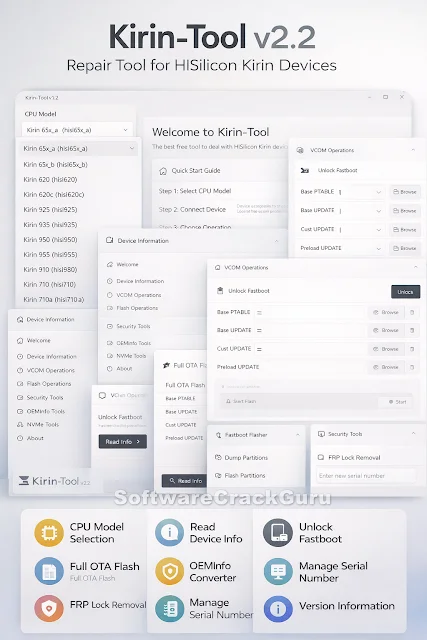
Kirin-Tool v2.2 is a small Windows tool made for Huawei phones that use Kirin processors.
If your phone is stuck on the logo, not booting, or showing update errors, this tool can help.
It is mainly used by mobile repair technicians, but normal users can also use it carefully.
Sometimes Huawei devices are hard to repair with normal flashing tools.
Kirin-Tool gives better control in special modes like VCOM and Fastboot.
With the correct steps, you can fix many common software problems.
What is Kirin-Tool?
Kirin-Tool is a free program for Huawei devices powered by Kirin chipsets.
It supports many processors like Kirin 620, 650 series, 710, 950, 960, 970, 980 and more.
This tool is not for daily use.
It is used when something goes wrong with the phone software.
For example, boot problems, FRP lock, firmware issues, or fastboot lock.
Supported Kirin CPU Models
- Kirin 65x (hisi65x_a / hisi65x_b)
- Kirin 620 / 620c
- Kirin 925 / 935
- Kirin 950 / 955
- Kirin 960
- Kirin 970
- Kirin 980
- Kirin 710 / 710a
- Kirin K3v2
Always select the correct CPU before starting any process.
Wrong selection can cause problems.
Main Features in Simple Words
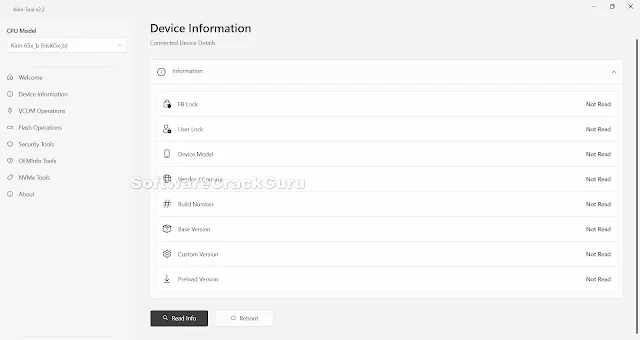
1. Device Information
You can check lock status, model number, vendor info, build version, and other details.
This helps you understand the phone condition before repair.
2. Unlock Fastboot
You can unlock fastboot in supported cases.
This is useful before flashing firmware.
3. Flash Operations
You can flash base files, update files, custom files, and preload files.
There is also a fastboot flasher option to dump or flash partitions.
This section is helpful if the phone is stuck, soft-bricked, or not booting.
4. FRP Removal
You can remove FRP lock in supported situations.
Use this only on your own device and follow proper rules.
5. OEMInfo Tools
You can convert OEM info or read it from the device.
This is useful when fixing region or firmware mismatch problems.
6. NVMe Tools
You can read or write serial numbers in advanced repair cases.
How to Use Kirin-Tool (Basic Steps)
Step 1: Install Kirin-Tool on your Windows PC.
Step 2: Install proper USB drivers.
Step 3: Select your correct Kirin CPU.
Step 4: Connect phone in VCOM or Fastboot mode.
Step 5: Choose the required option (Flash, Security, OEMInfo, etc.).
Step 6: Click start and wait until process finishes.
Do not disconnect the cable during flashing.
Real Example
If your Huawei phone is stuck on the logo and not starting, you can use Full OTA Flash.
Select the correct CPU, load the firmware files, and flash them.
In many software cases, the phone starts working again.
If someone forgets their Google account after reset, FRP removal option can help in supported devices.
Benefits
- Supports many Kirin processors
- Clean and simple interface
- Useful for flashing and repair
- Helps fix boot issues
- Saves time for technicians
Important Warning
This tool makes deep changes in your device software.
If used in the wrong way, it can damage your phone.
- Select correct CPU
- Use correct firmware files
- Do not unplug cable during process
- Use at your own risk
Download Kirin-Tool v2.2
Download from MediaFire
Download from GitHub
FAQs
Is Kirin-Tool free?
Yes, it is completely free.
Can I use it on all Huawei phones?
Only on phones that use supported Kirin processors.
Can it fix a dead phone?
It can fix software-related issues, but not hardware damage.
Do I need drivers?
Yes, proper USB drivers are required for VCOM or Fastboot mode.