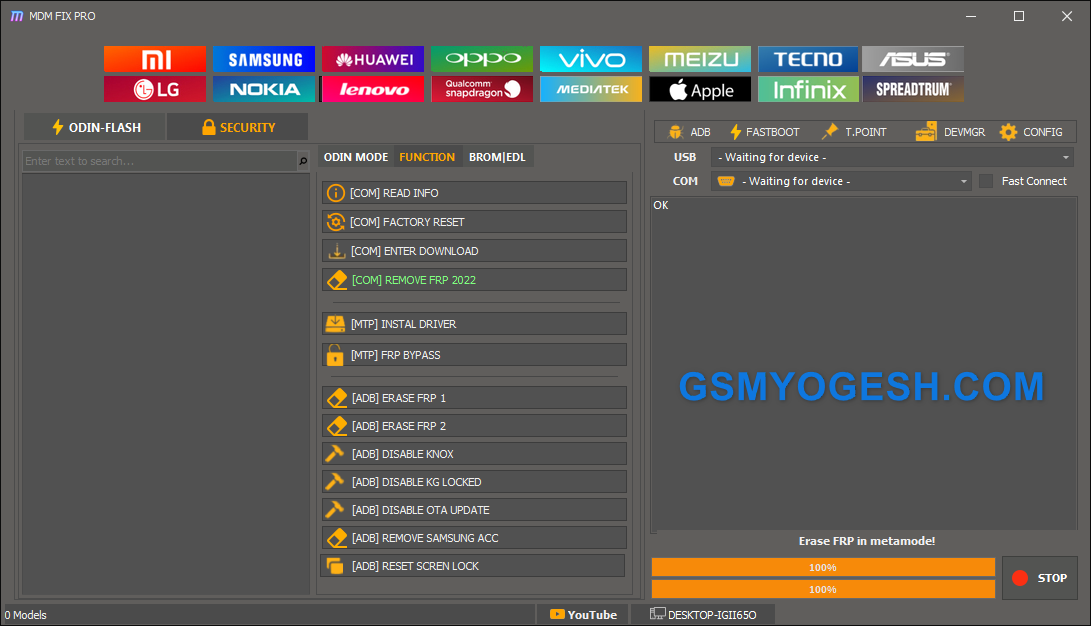
If you repair Android or iPhone devices, you’ve probably come across MDM FIX PRO. It’s a handy tool that brings Qualcomm, MTK, Samsung, Xiaomi, PAC and iOS functions together in one place. This updated version now includes login support, and you can activate and run it with the patch provided by GSMYOGESH.COM.
In this guide, I’ll walk you through the complete setup process, explain how to activate the login, and share important notes you should know before using the tool.
What is MDM FIX PRO?
MDM FIX PRO is a multi-brand service tool used for operations like FRP removal, factory reset, flashing, EDL work, DIAG tools, bootloader services, iOS ramdisk, DFU fix, and much more. It supports Xiaomi, Samsung, Qualcomm, MTK, Vivo, Oppo, Infinix, Tecno, Meizu, Nokia and several other brands.
Whether you’re handling FRP issues, device resets or EDL-level firmware tasks, this tool offers almost everything technicians need in a single package.
Also – GSMYOGESH Windows Fix Tool 2025 Free Download
Important Warning
Before you continue, please read this:
The tool is not working with model fetching because the developer has restricted the server side. The model number will not load automatically. You can still use the tool, but only on your own responsibility. I cannot guarantee it will work 100%.
Use it wisely, especially on sensitive devices.
MDM FIX PRO Tool Features
Here’s a quick overview of what the tool can do:
- Qualcomm EDL flashing, FRP, factory reset
- MTK old, meta and universal functions
- Samsung Odin mode + ADB + MTP FRP
- Xiaomi Mi Flash, Micloud reset and sideload options
- iOS Ramdisk, DFU fix, passcode tools
- PAC flash, FRP and IMEI DIAG
- ADB and Fastboot basic commands
- DIAG read/write IMEI, QCN
- Bootloader repair, slot switching, NV backup
- And much more…
This latest build includes a clean UI with brand shortcuts, device logs and fast connection options.
How to Install and Activate MDM FIX PRO (Login Added)
Follow these steps exactly to avoid login or patch errors.
Step 1: Run the main tool as administrator
Open the main folder and right-click on:
MDM FIX PRO UNLOCK TOOL Beta.exe
Select Run as administrator.
This prevents login failure and driver issues.
Step 2: Extract the login patch file
Find this file inside your download:
Unlock_Tool_MDM_FIX_Login.rar
Extract it to your desktop or tool folder.
Step 3: Run the Patch Tool
Open the patch EXE and click Activate Now.
Once you see:
Patch Activated
you can move to the next step.
Step 4: Open the MDM FIX PRO Login Window
Run the tool again. The login box will appear with:
- Username field
- Password field
- Theme option
- Remember Me checkbox
Step 5: Enter your login details
Type your username and password.
Tick Remember Me if you want quick login next time.
Click Login.
Step 6: Wait for successful verification
A progress bar will load and you’ll see:
“Login successful. Retrieving user info…”
After that, the tool will launch normally and all functions will become available.
Troubleshooting Tips
If you face login or patch issues:
- Always run both files as administrator
- Disable antivirus before using the patch
- Make sure no old version of the tool is running in background
- Restart your PC after activation if needed
Downlaod Link
MediaFire – http://www.mediafire.com/file/9hymt2c30vskajq/MDMFIX_UNLOCKTOOL.rar
JioCloud – https://www.jioaicloud.com/l/?u=9GSQz022v7FmmFe3wd71f9W76ZTMpfmtUeGmv8Oh-iXKM6X_yKt7lc-GJy-voBW0doB
EXE Password:- mdmfixpro@2025
RAR Password:- softwarecrackguru