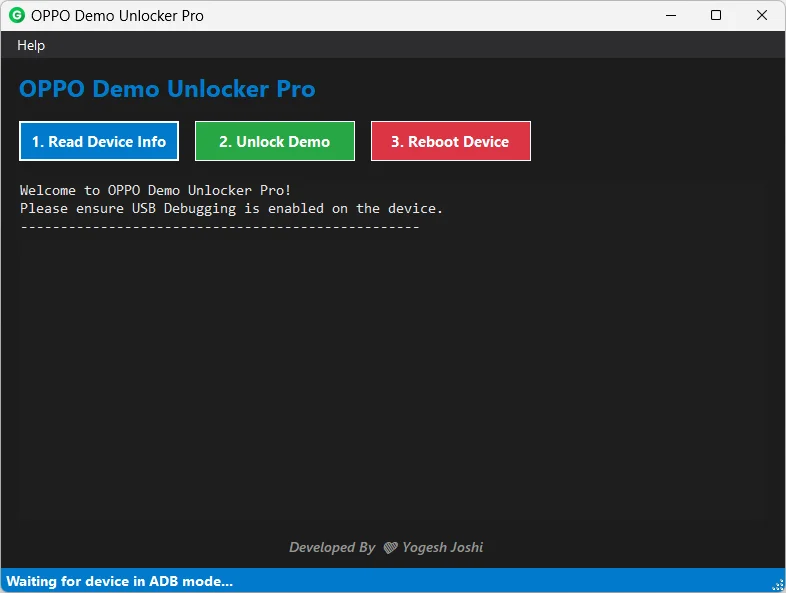
OPPO Demo Unlocker Pro – Remove OPPO Demo Mode Easily (Full Guide)
If you bought an OPPO display phone at a low price and now demo videos keep playing again and again, don’t worry. Your phone is not damaged. It is just running in Demo Mode. In this guide, I will explain what Demo Mode is, why it happens, and how you can remove it easily using OPPO Demo Unlocker Pro.
What is OPPO Demo Mode?
Demo Mode is a special setting used in mobile shops. When new OPPO phones are kept in stores for display, they are locked in a demo system. This system shows features, camera samples, and promotional videos again and again.
This mode protects the phone in the shop. Customers cannot change important settings or install apps. But after buying the phone, Demo Mode becomes a problem because you cannot use the device normally.
Common Problems in Demo Mode
- Demo video keeps playing
- Apps get deleted automatically
- Phone resets again and again
- Settings are locked
- Cannot use phone as personal device
What is OPPO Demo Unlocker Pro?
OPPO Demo Unlocker Pro is a simple Windows tool that helps remove Demo Mode from OPPO smartphones. You do not need advanced knowledge. The tool works with one click and makes the phone normal again.
Earlier, people had to use difficult commands or visit repair shops. Now you can do it yourself at home.
Features of OPPO Demo Unlocker Pro
- Remove OPPO Demo Mode quickly
- Simple and user-friendly interface
- No complicated steps
- Works offline
- Saves time and money
- Safe unlocking process
How to Remove OPPO Demo Mode (Step-by-Step Guide)
- Turn on your OPPO phone.
- Go to Settings and open About Phone.
- Tap Build Number several times to enable Developer Options.
- Go back and open Developer Options.
- Turn on USB Debugging.
- Connect the phone to your Windows computer using a USB cable.
- Open OPPO Demo Unlocker Pro on your PC.
- Click on “Read Device Info” to detect your phone.
- Click on “Unlock Demo”.
- Wait for the process to complete.
- Reboot the phone.
After restart, Demo Mode will be removed and your phone will work like a normal device.
Advantages of Removing Demo Mode
- You can install any app
- No more demo videos
- No automatic reset
- Full control of settings
- Use phone as personal device
Download OPPO Demo Unlocker Pro
You can download the latest version of OPPO Demo Unlocker Pro from the link below:
Download OPPO Demo Unlocker Pro
Important Note
Make sure to backup your important data before performing any unlocking process. Use the tool carefully and only on OPPO devices that are legally purchased.
Frequently Asked Questions (FAQs)
1. Is OPPO Demo Unlocker Pro safe to use?
Yes, when used correctly on supported OPPO devices, it safely removes Demo Mode.
2. Do I need internet to use this tool?
No, the tool works offline on a Windows computer.
3. Will removing Demo Mode delete my data?
Normally it does not delete data, but keeping a backup is always recommended.
4. Can this tool work on other brands?
No, this tool is specially designed for OPPO smartphones.
5. Is a computer required?
Yes, you need a Windows PC to run OPPO Demo Unlocker Pro.
Now you can easily fix your OPPO demo phone and enjoy full access without any limits. If this guide helped you, share it with others who are facing the same problem.