If you have ever worked in a mobile repair shop, you know the frustration. A customer walks in with a OnePlus or Oppo phone stuck at the logo screen. They are impatient, worried, and sometimes even angry. You know the solution is simple — flash the correct firmware — but finding that firmware online is a nightmare.
Pop‑ups, fake download buttons, slow servers, and broken links waste precious time. By the time you finally get the file, you could have repaired two other devices. This is not just inconvenient; it directly affects your business reputation and income.
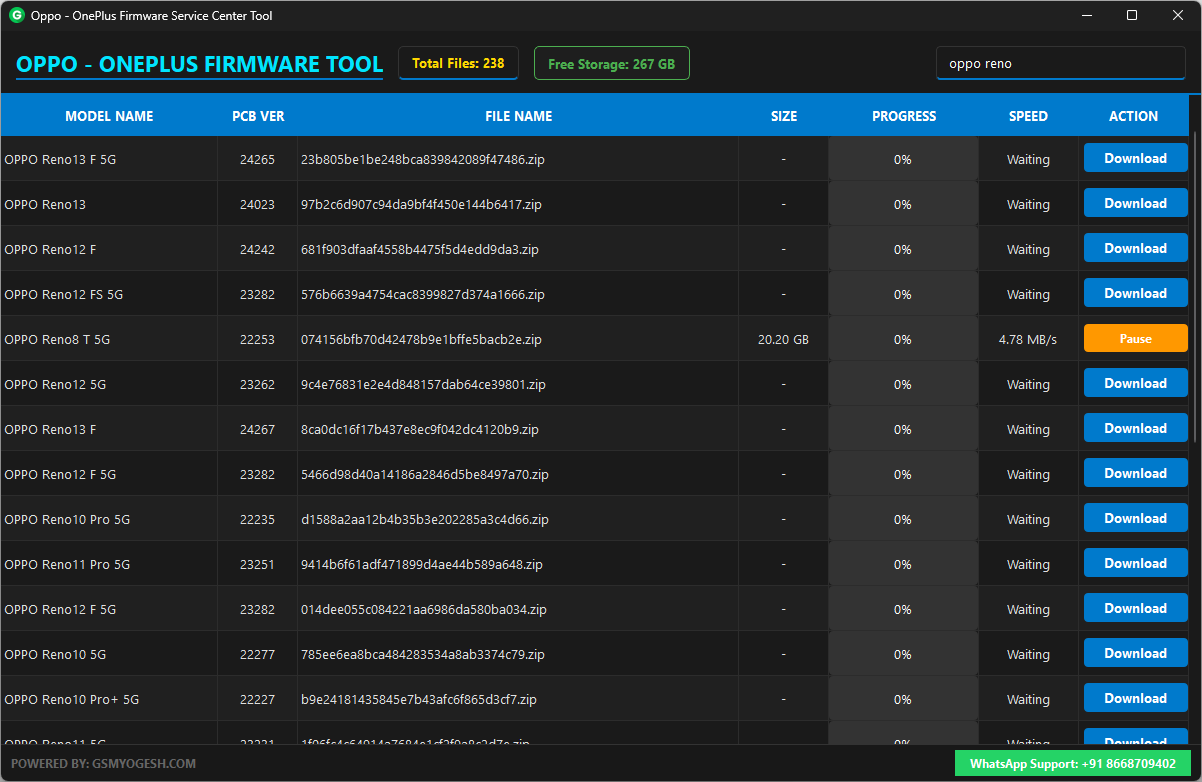
That’s why tools like the Oppo – OnePlus Firmware Service Center Tool 2025 are becoming essential for technicians. In this article, I’ll explain how this tool works, why it matters, and share real‑life examples from repair shops that prove its value.
Why Firmware Tools Matter in 2025
Smartphones are more advanced than ever, but they are also more fragile when it comes to software. A single corrupted update or failed root attempt can brick a device. Customers don’t care about the technical details — they just want their phone back.
For technicians, firmware tools are like oxygen. Without them, you cannot revive a dead phone. But the challenge is not just having firmware; it’s about having it organized, reliable, and easy to access.
That’s where the Service Center Tool shines.
Also – Xiaomi Firmware Downloader Tool (FREE)
Key Features Explained in Simple English
1. Clean & Sorted Downloads
Normally, your browser throws every file into the same Downloads folder. After a week, it’s chaos. You don’t remember which firmware belongs to which model.
This tool automatically creates folders with the exact phone model name. For example:
- If you download firmware for OnePlus 12R, it creates a folder called “OnePlus 12R” and puts the file inside.
- No renaming, no confusion, no wasted time.
This small feature saves hours every month.
2. Storage Indicator
Firmware files are huge — often 4GB to 8GB. If your PC has only 2GB free, the download will fail halfway.
The tool shows your available storage upfront. If your free space drops below 10GB, the indicator turns red. This warning prevents failed downloads and wasted bandwidth.
3. Pause & Resume That Works
Every technician knows the pain: Wi‑Fi drops for two minutes, and the browser resets the download to 0%.
This tool supports real pause/resume. You can pause anytime, close the tool, reopen it later, and continue exactly from where it stopped.
4. File Size Before Download
Most websites don’t show file size until the download begins. This tool checks the server first and displays the full size in the table. You know exactly how big the firmware is before clicking.
Real Life Example: A Technician’s Story
Let’s take the story of Ravi, who runs a small repair shop in Pune, India.
One day, a customer brought in a OnePlus 11R stuck on the logo screen. Ravi knew he needed the firmware, but his usual sources were full of ads and broken links. He wasted 45 minutes just trying to find a working download.
The customer grew impatient and threatened to leave. That’s when Ravi remembered the Service Center Tool. He opened it, searched for OnePlus 11R, and within seconds the download started — clean, sorted, and reliable.
The phone was fixed in 20 minutes. The customer was happy, paid the bill, and even recommended Ravi’s shop to friends.
This is the difference a good tool makes: not just saving time, but saving reputation and income.
How to Set It Up
- Download the zip file.
- Extract it to your Desktop or another folder (don’t run it from inside the zip).
- Inside the folder, you’ll see:
- GSMYOGESH_Firmware_Tool.exe
- data.dll
Important: These two files must stay together. If you move the EXE alone, the tool won’t open because it can’t find data.dll.
No installation required. Just extract and run.
Download Link
MediaFire – http://www.mediafire.com/file/c623vbkeu6littk/GSMYOGESH_Firmware_Tool_FREE_2025.rar
JioCloud – https://www.jioaicloud.com/l/?u=ukKIUjclkS0pIE0WcU6UkbBhfoqupM8OQPhbtsHebeUfD2XzdRw6GrWL8OcCinRRdoB
Supported Models
The tool supports a wide range of devices from OnePlus, Realme, and Oppo. From flagship models like OnePlus 13 and Oppo Find X8 Pro to budget devices like Realme C65, everything is covered.
This wide coverage means technicians don’t need multiple tools or websites. One tool handles it all.
Real Life Example 2: Saving a Business Day
Another technician, Meena, runs a shop in Hyderabad. She had three phones waiting: Oppo A78, Realme GT Neo5, and OnePlus Nord CE4 Lite.
Normally, she would spend hours juggling different websites, searching for firmware, and fighting with broken links. But with the Service Center Tool, she queued all three downloads in minutes.
By lunchtime, all three phones were repaired. Customers were impressed with the speed, and Meena earned three positive Google reviews that day.
This shows how the tool doesn’t just save time — it directly boosts business growth.
FAQs
Q: Is the tool free?
Yes. It’s community‑friendly. Use it freely.
Q: My download stopped. What should I do?
Just press Resume. It continues from where it paused.
Q: The tool says “data.dll not found.”
You moved the EXE without the DLL. Put them back in the same folder.
Q: Can you add more models?
Yes. There’s a WhatsApp Support button in the tool. Message directly and request.
Conclusion: Why This Tool Is a Must‑Have in 2025
In the fast‑paced world of mobile repair, time is money. Customers don’t want excuses; they want solutions. The Oppo – OnePlus Firmware Service Center Tool 2025 is not just another utility — it’s a lifeline for technicians.
By keeping downloads clean, showing storage upfront, supporting pause/resume, and displaying file sizes before download, it eliminates the biggest frustrations of firmware repair.
Real‑life examples from shops in Pune and Hyderabad prove that this tool saves time, protects reputation, and even boosts income.
If you run a repair shop, this tool is not optional — it’s essential.