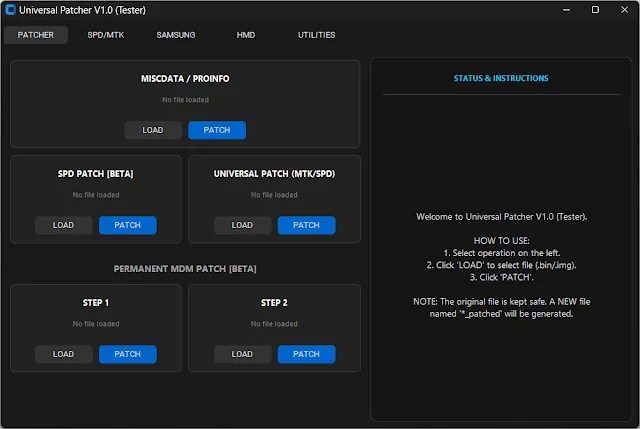
Universal Patcher V1.0 Tester – Free Download for MTK & SPD Devices
If you repair mobile phones, you know how stressful software problems can be.
A phone gets stuck on the logo. It shows strange errors. Sometimes it is locked with MDM or KG lock.
And the customer is standing in front of you, waiting.
Earlier, fixing these problems was risky. One small mistake and the phone could become fully dead.
You had to download big firmware files again and again. It wasted time and internet data.
Now there is an easier way. Universal Patcher V1.0 Tester makes the work simple and safer.

What is Universal Patcher?
Think of phone software like a big house with many rooms.
Sometimes a few rooms get locked because of errors or security problems.
Because of this, the phone cannot start properly.
Universal Patcher works like a smart key.
It fixes the problem part inside the firmware file without damaging the rest.
You load files like super.img or misc.bin, and the tool creates a fixed version.
Why This Tool is Important
Before this tool, technicians had to:
- Edit files manually
- Use difficult commands
- Take big risks
- Redownload firmware if something failed
If one mistake happened, the original file was damaged.
Then again download 4GB or 5GB firmware. Very frustrating.
So we needed something simple, safe, and fast.
That is where Universal Patcher V1.0 comes in.
What’s New in V1.0 Tester
The biggest improvement is safety.
The tool never changes your original firmware file.
It:
- Reads your original file
- Creates a fresh copy
- Applies fixes to the new copy
- Saves it with a new name like “_patched”
Your original file always stays safe.
It also shows a clean status screen.
You can clearly see what the tool is doing.
No confusing messages.
How to Use Universal Patcher
Step 1: Open the Tool
Double click the application icon.
Step 2: Select Device Type
Choose your device type:
- MTK (MediaTek)
- SPD (Unisoc)
Step 3: Load Firmware File
Click the LOAD button and select your firmware file.
Step 4: Click PATCH
Press the blue PATCH button.
Step 5: Wait for Success
After a few seconds, it shows SUCCESS.
Your patched file is ready to flash.
No coding. No hard commands.
Real Example
A customer brings a phone stuck on logo because of a security lock.
Earlier, you would spend 1 or 2 hours testing risky methods.
Now you:
- Load firmware
- Click patch
- Flash the file
- Finish in minutes
This saves time and makes your work faster.
Main Advantages
1. Very Safe
Original firmware file is never changed.
2. Easy to Use
No technical commands needed.
3. Saves Time
Work that took hours now takes minutes.
4. Works Offline
No internet connection required.
Who Should Use It?
- Mobile repair shop owners
- Software technicians
- Beginners learning phone repair
- Anyone working with MTK or SPD devices
Even beginners can use it easily.
Download Universal Patcher V1.0 Tester
Universal Patcher V1.0 Tester:
Download from MediaFire
Download from GitHub (Direct Link)
No password required.
Frequently Asked Questions
Is it safe for my firmware files?
Yes. It creates a new patched copy and keeps your original file safe.
Can it brick my phone?
The tool only edits files on your computer.
If flashing is done correctly, patching itself is safe.
Do I need internet?
No. It works fully offline.
Which processors are supported?
Mainly MTK (MediaTek) and SPD (Unisoc) devices.
Is it good for beginners?
Yes. If you know how to load a file and click a button, you can use it.