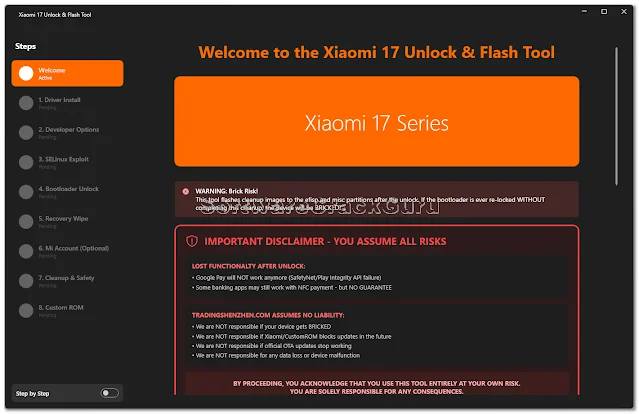
Xiaomi 17 Series Unlock & Flash Tool – Easy Method to Unlock Bootloader and Flash ROM
If you are using Xiaomi 17 series phone, Poco F8 Ultra, or Redmi K90 Pro Max, then this tool can be very useful for you.
A new Xiaomi 17 Unlock and Flash Tool is now available which helps to unlock bootloader and flash ROM easily.
Earlier this process was difficult and time taking, but now the process is much faster and simple.
Many mobile technicians are already using this tool and the results are good.
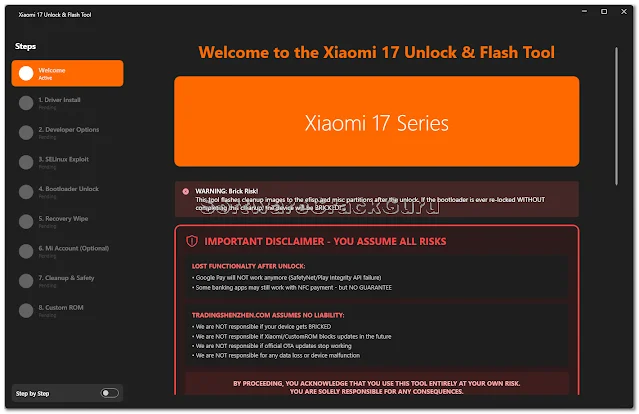
What is Xiaomi 17 Unlock & Flash Tool?
This is a Windows tool made for Xiaomi 17 series devices.
With this tool, you can unlock the bootloader, flash firmware, install custom ROM, and also fix software problems.
The tool works because Snapdragon 8 Elite processor has a small security weakness and the tool uses it to unlock the device quickly.
Tool Features
- Bootloader unlock in simple steps
- Flash stock ROM
- Install custom ROM like Xiaomi.eu
- Fix bootloop and software issues
- Automatic security patch check
- Simple user interface
- Works on Windows computer
Important Information
This unlock method works only on phones that have security patch up to March update.
If your phone is updated after March, then this method may not work.
But don’t worry, the tool will check everything first and then start the process.
Supported Devices
- Xiaomi 17
- Xiaomi 17 Pro
- Xiaomi 17 Pro Max
- Xiaomi 17 Ultra
- Poco F8 Ultra
- Redmi K90 Pro Max
How to Use Xiaomi 17 Unlock Tool
- First install USB drivers on your PC
- Enable Developer Options in phone
- Turn ON USB Debugging
- Connect phone to computer
- Open Xiaomi Unlock & Flash Tool
- Follow steps shown in tool
- Unlock bootloader
- Flash ROM if needed
My Personal Experience (Shop Tested)
In my mobile shop, many customers bring China ROM phones and they want Global ROM or custom ROM.
Earlier bootloader unlock was very slow and sometimes took many days.
But after using this Xiaomi 17 Unlock Tool, the work became much easier.
We tested this tool on some Xiaomi 17 series devices and unlock process completed without major problem.
But always remember, unlocking will erase all data, so backup is very important before starting.
Advantages of This Tool
- Unlock bootloader quickly
- Flash ROM easily
- Fix software problems
- Useful for mobile technicians
- Simple process
- No long waiting time
Download Xiaomi 17 Unlock & Flash Tool
You can download this tool from trusted flashing websites or official source.
Always scan the file before using and use a good USB cable during flashing.
This tool works only on Windows PC.
FAQs
1. Will bootloader unlock erase data?
Yes, unlocking bootloader will erase all data from the phone. Always take backup first.
2. Does this tool work on latest update?
No, this works mostly on devices with March security patch or older.
3. Can I install Global ROM after unlock?
Yes, after unlocking bootloader you can flash Global ROM or Xiaomi.eu ROM.
4. Is this tool safe to use?
If you follow steps properly, it works fine, but unlocking always has some risk.
5. Does this tool work on Mac?
No, this tool works only on Windows computer.