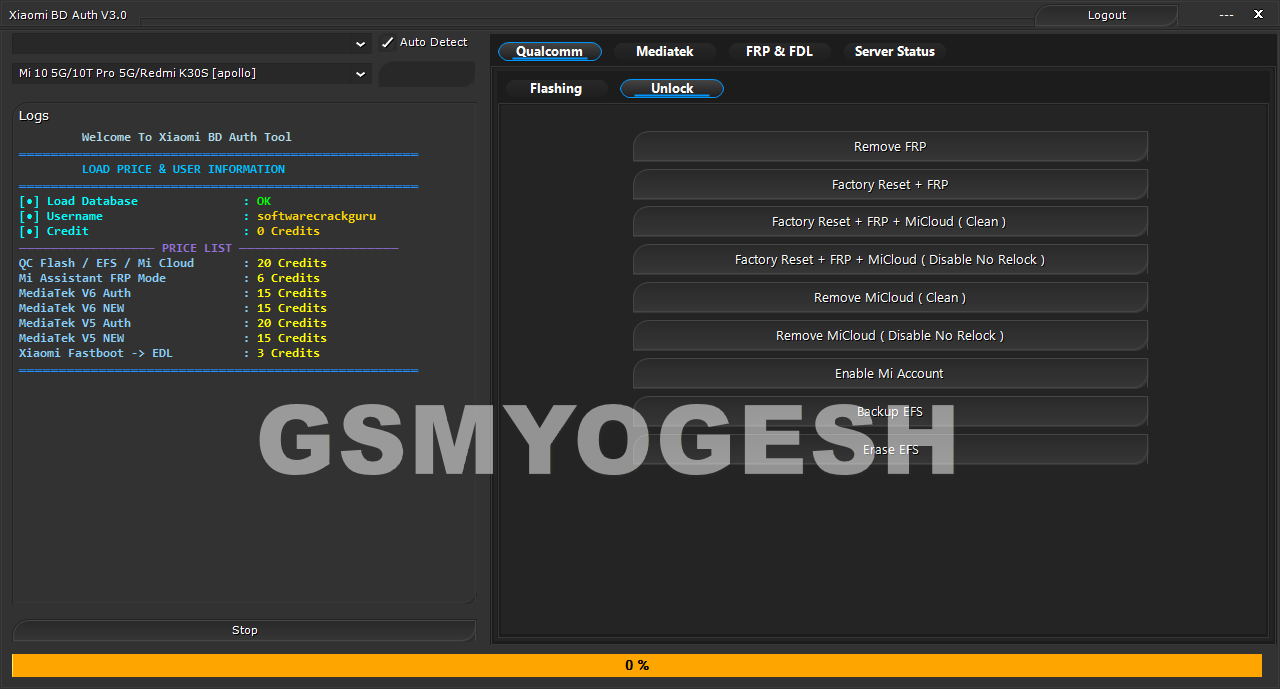
Xiaomi BD Auth V3.0 is a small tool for windows computer. it is allowed users to perfom many kind of operation on with a auth or auth free both. this is expermental purpose i have added a small login bypasser that hel you to use with any login enter and open the program with a single click only.
🔎 What Is Xiaomi BD Auth Tool?
The Xiaomi BD Auth Tool is a professional utility that helps users unlock and repair Xiaomi devices. If your phone is stuck due to FRP lock or Mi Account lock, this tool provides quick solutions to regain access. Beyond unlocking, it also supports flashing, partition management, and Mediatek chipset operations, making it a complete repair package.
🔐 Unlock Features
- Remove FRP lock
- Factory Reset + FRP
- Factory Reset + FRP + MiCloud (Clean)
- Factory Reset + FRP + MiCloud (Disable No Relock)
- Remove MiCloud (Clean / Disable No Relock)
- Enable or Reset Mi Account
- Disable Mi Account + Factory Reset + FRP
- Erase NV / EFS
- Backup EFS
💻 Flashing Features
- Load firmware, patch, or firehose files
- Read GPT and write flash
- Backup or erase partitions
- Reboot device easily
- Select storage type (eMMC)
- Skip or backup protected partitions
⚙️ Mediatek Options
- Select DA (MTK_All_In_One_DA)
- Bypass authentication
- USB high-speed mode
- Manual authentication
- Force BROM mode
- Repartition and auto reboot
- Auto factory reset
- Show hidden files
- Support for Xiaomi’s new security
🛠 ENG Preloader
The ENG Preloader option is designed for deep-level repair tasks. It is especially useful when normal flashing methods fail.
- Write ENG Preloader
📲 Mi Assistant Operations
- Remove FRP (Auth)
- Wipe storage
- Factory reset
🚀 Fastboot Operations
- Read device information
- Reboot to bootloader
- Fastboot to EDL
- Fix soft brick issues
- Unlock bootloader
- Reboot to recovery
🌐 Server & ADB Options
- Server status tab
- Manual authentication option
- Start or stop ADB server
- Auto-detect device
- PL server checkbox
Also – FlexUnlock Tool v1.2.17.00 Free Download (Automatically Update Disable)
📖 How to Use Xiaomi BD Auth V3.0 (Step-by-Step Guide)
This tool is designed for everyday users. Follow these steps carefully:
Step 1: Download & Extract
Download the tool (ZIP/RAR format) and extract it to a folder on your PC.
Step 2: Run as Administrator
Right-click the tool file → select Run as Administrator.
Step 3: Wait for Main Window
The tool window will open. Wait until it fully loads.
Step 4: Activate
Click Activate Now 🚀 once. The tool will start automatically.
Step 5: Allow Security Prompts
If Windows shows a security message, click Allow/Yes.
Step 6: Check Status Messages
Look for messages like:
- Patch Activated
- Server… Done (Successfully!)
Step 7: Access Confirmation
When you see “Access granted. You may now use the tool.”, setup is complete.
Step 8: Use Xiaomi Tool
Keep the patch tool running in the background while using the Xiaomi tool.
Step 9: Close Safely
After finishing, close the patch tool normally. It will auto-stop and clean proxy settings.
Download Link
- Xiaomi BD Auth Tool V3.0 – MediaFire | Google Drive | OneDrive
- Password:- softwarecrackguru
⭐ Why Xiaomi BD Auth Tool Is Popular
- All-in-one Xiaomi repair features
- FRP and Mi Account solutions
- Strong flashing support
- Beginner-friendly interface
- Widely used in mobile repair shops
❓ FAQs
Q1: Is login required?
Yes, login is mandatory to use this tool.
Q2: Does it support Mediatek phones?
Yes, Mediatek chipset options are included.
Q3: Can it remove Mi Account?
Yes, both clean and no-relock options are available.
Q4: Is it beginner-friendly?
Absolutely. The interface is simple and easy to use.