Kleister and PDT Platform Detector V1.0.5 – Free Download (No Dongle Required)
Kleister and PDT Platform Detector are tools used by many mobile repair technicians. These tools help when a phone is completely dead, stuck on logo, or not responding. In such cases, normal flashing does not work. So technicians first read the phone memory and save it safely.
The best thing is that no dongle is required. This makes the tool easier and cheaper to use.
What is RawTool?
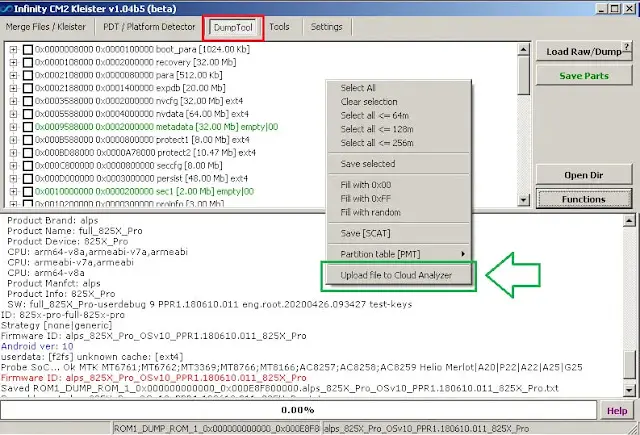
RawTool is used to read the phone’s internal memory. When you connect the phone and start reading, it creates a full copy of the phone storage. This file is called a raw dump or full image.
This backup is very important. If something goes wrong during repair, you already have a saved copy of the phone data.
Why Read Memory in Parts?
Reading the full memory in one big file is not safe. The file becomes very large and errors can happen.
- Cable may disconnect
- Battery may drop
- Process may stop in between
Because of this, experienced users always read memory in small parts. It is slower but much safer.
What Does Kleister Tool Do?
After reading memory in parts, many small files are saved. These files cannot be used directly.
Kleister Tool merges all those parts into one complete memory file. You just select all parts and click merge. After merging, you get one full image file that can be used for flashing or repair.
Changelog – Version 1.05
- File names now include start address
- Added support for more TV partition types
- SquashFS detection added
- Partition fill operations run faster
Main Features
- No dongle required
- Easy to use
- Works on dead phones
- Safe memory reading
- Supports large storage
- Merge dump parts easily
- Detect Android and firmware version
- Supports multiple partition types
How to Use (Simple Steps)
- Connect the phone to your computer using a good USB cable.
- Open RawTool and select the read option.
- Start reading from the beginning address.
- Choose a small size like 2GB or 4GB.
- After one part is finished, change the start address.
- Repeat until the full memory is read.
- Open Kleister Tool.
- Select all dump files.
- Click merge and wait.
- You will get one full memory file.
Real Life Example
If a phone comes completely dead and does not turn on, you can still read its memory using RawTool. After merging parts with Kleister, you will have a full backup. Now you can try repair methods without fear of data loss.
Download Section
Kleister and PDT Platform Detector V1.0.5 (Latest)
Password: 1111
Previous Versions
FAQs
Can I use Kleister without a dongle?
Yes, it works without any dongle.
Is this safe for beginners?
Yes, just follow the steps carefully.
Why should memory be read in parts?
To avoid errors and file damage.
What do I do after merging files?
You can use the file for flashing or repair.
Is this method commonly used?
Yes, many technicians use it daily.